When you guys have visited potential apartments, what kind of questions did you ask besides the basics like what rent and utilities include?
Here are questions I didn’t ask but should have: what does the basement look like?
What measures are taken to secure the building ?
Are the walls thin? Brief info of who lives in the building. Are they college kids? People that work through the day? Elderly? Is it a mix? Where does the garbage go?
Can I pay rent bi-weekly? What kind of fuses does the apartment use? (My fuse box is in the basement. If I blow a fuse I have to replace it myself. They screw until the box. All of which I didn’t know until it happend and I was sitting in the dark suddenly)
Who do I call for repairs? (If it’s a private rental) Am I allowed to paint the walls? Is there any additional storage? Do you do regular pest control?
count the outlets, ask about recycling policies, ask if there’s a noise restriction (nothing loud after midnight, everything goes on the weekend, etc)
LAUNDRY FACILITIES Definitely ask about security Whether subletting is allowed (esp if you’re in college and might want to sublet for the summer) If you have a car, whether there’s parking/how much it costs What kind of heating/AC there is Procedure/response time for any maintenance How mail/packages are received/protected from theft (seriously people stealing your packages can be a huge problem) What kind of verification of your salary will they want, and in what circumstances will they accept a guarantor instead? Whether the apartment is furnished
Assuming you are in the middle of looking at/choosing between places: When does the lease start? Are you going to give preference to people based on when they can move in? Whether groups of a certain number of people get preference Really anything about who they prioritize for applications, it can save you a lot of trouble in trying to apply to places you’ll never get into
not something for asking the realtors, necessarily, but important rights you should be aware of as a tenant:
when and for what reasons are your landlords allowed to enter your home? how much of a notice should they give you before entering?
can the landlord make modifications to your home or apartment without your approval? to what extent?
what are the options and conditions for breaking your lease early if there’s an emergency? (this is ESPECIALLY important for anyone moving to a new state/considerable distance where you are not able to visit the apartment/home before you rent – students get taken advantage of ALL THE TIME with this shit)
if your first or last month at the property is a partial stay (i.e. you move in on july 15th, and rent is typically due on the first) make sure you don’t pay the full first month’s rent before you know the area laws! in many states, you are only legally required to pay for the time you are occupying the property
is renter’s insurance necessary? many apartments want at least 30k coverage, which can run a couple hundred dollars extra per year
are the landlords/property management liable for crimes on the property? for example, if your car was broken into. if not GET RENTER’S INSURANCE
-ask if there’s any property upkeep you can do to get a bit off the rent (aka, can they take 100$ off the monthly rent if you maintain the lawns/garden, etc.)
-ask if there’s been any consistent/frequent trouble with electricity/internet connectivity/cable if you have it
-what KIND of electricity?
-what kind of heating (hot water/electric)
-how secure is the neighborhood (if you don’t know)
-ANY PLUMBING ISSUES? check ALL the fucking taps, the showers, EVERYTHING WITH WATER to make sure it all works right.
-ANY PLUMBING ISSUES? check ALL the fucking taps, the showers, EVERYTHING WITH WATER to make sure it all works right.
I CANNOT SECOND THIS ENOUGH.
ALSO
– who last lived here? why did they leave?
– Do they charge an “amenities fee” (Around here you can’t avoid them at all now, but some places you might still be able to)
– Do they have a policy on rent increases? (Also check if there’s a legal limit to rent increases in the area).
– Are utilities paid in a separate check or with the rent?
– Are utilities metered or pro-rated (in older buildings it’s common to be charged by square footage and/or number of occupants, which can leave you subsidizing the people who turn the a/c down to 60 in the summer or the heat up to 80 in the winter – you may not be able to avoid this but it’s worth trying).
– Are there any switched circuits in the apartment. Buildings built in the late sixties through the early eighties often have switched circuits. If they do, then with the number of devices used these days you will probably have to have something important on the switched circuit – tape the switch in the on position! (Trust me).
– What are the rules on hanging pictures?
– Who is responsible for paying for and replacing bulbs in permanent fixtures? If it’s you and there’s a fixture with weird/unusual bulbs (globe style, chandelier style, etc) ask where you can buy the bulbs.
– What are the rules about pets? Do they have breed specific restrictions on dogs? Size restrictions on fish tanks? (Believe it or not that’s not uncommon).
This will be so useful once my lease is up thanks tumblr ☺️🙏🏾
Check your cell phone for how many bars you get. Nothing worse than moving in an find getting cell service is problematic.
Valuable information if some of your prized books were affected by recent flooding. The video even shows you what to do if you can’t dry the book out right away.
I’ve had this list sitting around for a while (in case I ever want to try something new) and I thought I’d share it, because why the hell not, everybody loves free stuff. I’ve only used a couple, so for all I know these could be complete shit. BUT YOU NEVER KNOW, RIGHT?
*= available for both windows and mac os
GIMP * – Does a lot of the same stuff as Photoshop.
FireAlpaca * – Similar to Paint Tool Sai, so it’s a good alternative for Mac users.
my attention span is so bad i cant watch something without being on my phone at the same time i always have to have 2 layers of activity when did this happen why is capitalism stealing my soul away the spectacle has me firmly in its grip
Psychology time!
This isn’t having a short attention span (or well maybe thats part of it), but probably something called “Optimal Arousal.”(This is psychology, not anatomy, please keep your mind out of the gutter Xp)
Optimal Arousal goes like this: When effort is low, more stimulus is better. When effort is high, less stimulus is better.
I’ll elaborate. Whenever you do something easy (like maybe some homework as an example), unless something else is happening (like music or a show) you tend to get drawn away or doze off. In this homework scenario, the effort is low, so in order to keep at it and do well on working on it, you need a higher amount of stimulus, like a movie.
If something is hard, like for instance a test, you probably will try to avoid noise, going so far as to hush others so you can concentrate. The effort is high so you want less stimulus.
Keep this in mind. It can help you focus, and make life a lot easier. Dont feel bad for doing lots of different things while you are just chillin. Enjoy the knowledge!
This is also the reason that when people get lost or are trying to find an unfamiliar destination, they turn their car stereo down.
Whoa wait turning down the music so you can “see better” is a real thing and not just something to poke fun at?
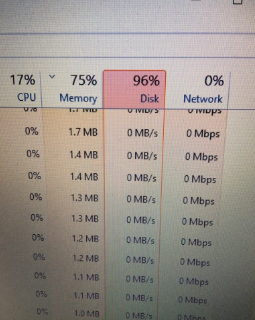
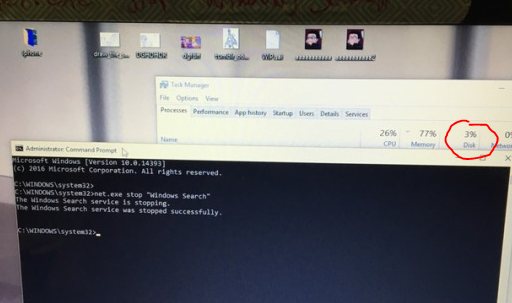
y’all didn’t even add a tutorial of how to do this so imma put one right here
1. type in cmd.exe into your windows search and right click on Command Promt search result and select “Run as Administator”. 2. Type/Copypase in
net.exe stop “Windows Search” and make sure Windows Search is in quotations. It should then respond saying “The Windows Search service is stopping” and then tell you it’s stopped.
This is only a temp fix though, if you want it switched off permanently then do THIS:
1. Press the Windows key + R at the same time and type in services.msc.
2. Scroll until you find Windows Search and double click it to enter its Properties window.
3. Change the Startup type to Disabled. Apply this change and you can exit out.
VOILA, NO MORE TAKEN UP DISK SPACE
Reblog to save a fucking life, FUCK CORTANA.
ALSO, IF YOU HAVE WINDOWS 10 AND ARE WONDERING WHY YOUR INTERNET BROWSING IS CONSUMING FAR MORE OF YOUR CAP THAN IT REALLY SHOULD BE, YOU MAY WANT TO GO TO SETTINGS -> UPDATE AND SECURITY -> ADVANCED OPTIONS -> DELIVERY OPTIMIZATION AND EITHER SWITCH “ALLOW DOWNLOADS FROM OTHER PCS” OFF, OR SET IT TO ONLY LOCAL NETWORK RATHER THAN LOCAL NETWORK AND THE INTERNET.
BASICALLY, SOMEONE WORKING ON WINDOWS 10 FIGURED OUT THAT THEY COULD SAVE ON BANDWIDTH BY SETTING UP WINDOWS 10 COMPUTERS TO DO PEER-TO-PEER SHARING WHETHER OR NOT THEIR USERS WANTED IT, AND WHICHEVER MICROSOFT EMPLOYEE IS FIRST TO TELL ME WHO IS RESPONSIBLE FOR THIS FAIRLY WEASELLY LITTLE STUNT GETS TO LIVE.
This is an extensive list of free computer programs that you can download. Most of the programs here are freeware, but a small number have only free trials available. The list originally came from the March 2008 issue of PC Magazine. There are programs on this list compatible for Windows, Mac, and Linux but I cannot guarantee if each program works with your system. I am also not responsible for any harm caused by any links. Please notify me of any programs I should add to the list or links I should update. Enjoy.
Top Apps
Adobe Reader: This simplest of Adobe’s PDF programs lets you do just about anything PDF-releated (besides creating new ones), including online collaboration. It includes a host of features to aid users with disabilities.
Audacity: Whether you’re recording or editing, Audacity is all about audio in practically any format.
GIMP: The GNU Image Manipulation Program (GIMP) does most of what Photoshop does.
Open Office: You can spend a lot for Microsoft Office or nothing for this suite with full-function word-processor, spreadsheet, database, presentations, even an equations editor.
Thunderbird: Mozilla’s no-cost e-mail alternative is extensible, fast, and easy to master. And a wealth of free add-ons means there’s not much this program won’t do, from calendars to encryption.
Ubuntu: This Linux-based operating system comes with many of the programs listed above and is absolutely free.
WinAmp: After a decade of playing music, the “skinnable” WinAmp has several versions, including one with full CD ripping and burning.
AntiVirus
Avast: Spiffy-looking Avast notifies you by e-mail or IM if it catches a virus. You can’t schedule scans, but its recovery database can help if a virus damages your files.
AVG Anti-Virus Free Edition: Its control center is awkward, but AVG scans files on demand, upon access, on a schedule, and in e-mail. Its rescue disks will help you recover from disaster.
Avira AntiVir Personal Edition Classic: AntiVir scans files on demand, upon access, and on a schedule; it doesn’t scan e-mail attachments until they’re saved but it does go to work on rootkits. It’s especially good at co-existing with other security software, it has the Virus Bulletin’s VB100% award and certification for virus detection from ICSA labs.
HijackThis: Run HijackThis, save a log, and then post the log on sites that support the program. You’ll quickly get personalized experts to help remove any malware.
NanoScan: In less than a minute, NanoScan can analyze all processes running on your computer and identify viruses, Trojan horses, spyware, or other malicious programs.
ThreatFire AntiVirus: Threatfire detects the bad guys by their behavior, not by outdated virus signatures. It’s surprisingly accurate and a good companion to standard antivirus apps.
Trend Micro HouseCall: Use the venerable House-Call online scanner to get a second opinion or use the app for cleanip when malware prevents installation of a local antivirus utility.
Firewalls
Comodo Firewall Pro: This protective dragon keeps hackers out of your system, controls which programs can access the Net (its whitelist of about one million means you get fewer pop-ups), and blocks tricky “leak test” techniques. It’s both tough and good-looking.
ShieldsUP!: Be sure your firewalls are keeping your always-on internet connection hidden from attackers. ShieldsUP! provides a quick confirmation.
SmoothWall Express: Got a spare PC? Turn it into a dedicated network firewall with this open-source download.
ZoneAlarm Free: The free edition remains a useful protector against hack attacks against programs that abuse your Internet connection.
Security
EULAlyzer: Wonder what you’re agreeing to when you click “I Accept”? Don’t worry; just drag EULAlyzer’s target icon onto the EULA for a quick report on any troublesome language.
Hotspot Shield: Create an instant virtual private network (VPN) tunnel between your laptop and the router at any Wi-Fi hot spot to protect your data from snoops on unsecured networks, even if you’re using extra encryption. If you’re on a network that limits the use of certain apps (such as Skype), the VPN could give you unfettered access. It even works with your wired connection for an extra layer of security.
Kruptos 2: Kruptos makes a file accessible only to someone who knows the password.
PC Flank: While ShieldsUP! tests your firewall’s ability to stealth all ports, PC Flank performs surgical strikes that emulate specific malware attacks to verify that your firewall blocks them.
Finance
GnuCash: Users can track their bank accounts, stocks, and expenses in this financial program using a double-entry accounting method.
Office
AbiWord: Volunteers keep this open-source word processor alive. It closely mimics the look and feel of Microsoft Word 2003 and earlier.
Gliffy: An online-only diagramming tool with more options than you can flowchart. The free version is limited to five diagrams.
Google Docs: Google’s slicky designed office suite offers online shared word processing, spreadsheets, and presentations – and best of all, a solid alternative in the office-suite space to the totally dominating Microsoft Upload or e-mail your current documents for storage and editing.
KompoZer: A full WYSIWYG Web-page authoring tool aking to Dreamweaver. KompoZer integrates an FTP site manager for file uploads.
NeoOffice: This is a version of OpenOffice for Mac OS.
Notepad++: Notepad++ handles text – especially source code – in ways that the basic Windows Notepad could only dream of, with embellishments like tabs and color coding.
Scribus: This open-source page layout tool has features comfortable to big names like Pagemaker, plus support for PDFs and scalable vector graphics (SVG).
Zoho: Zoho features every tool you could want – word processing, spreadsheet, presentations, database, even a wiki – and several you never knew you needed. Some are also available off-line.
Calendar/PIMs
Backpack: Backpack is more than a to-do list site. Your five easy-to-update pages send reminders via e-mail or SMS and include a whiteboard for online collaboration.
Essential/PIM Free: Imagine taking the e-mail out of Microsoft Outlook to get a killer personal information manager (PIM). That’s what EssentialPIM is all about.
Google Calendar: Featuring seamless integration with other Google products, sharing capabilities, and SMS reminders, this Web app does for calendars what Google did for search.
Lightning: To be more like Microsoft Outlook, Thunderbird needs a calendar. Lightning provides that, plus a to-do list. It can even sync with Google Calendar.
Microsoft PowerToys:
Microsoft PowerToys is a set of freeware system utilities for power users, developed by Microsoft for its flagship operating system, Windows. They include
Color Control Panel Applet,
Power Calculator, SyncToy, and others.
Remember the Milk: Never Forget another grocery item, or anything else, using this extensible online task manager. It’ll send reminders via e-mail, SMS, and IM.
Lightning Calendar: Lightning Calendar is Mozilla’s calendar that is meant to work with their other app; Thunderbird.
30 Boxes: One of the best-looking online calendars, 30 Boxes features easy-to-grasp pop-ups for adding events and viewing schedule details.
Yahoo! Calendar: Track your schedule and share it with friends, then sync your calendar with Outlook to your phone.
Backup/Sync
Allway Sync: Sync files between your PC and an external drive, filtering by folder, the name, or file type. The program displays warnings about questionable files before syncing.
DriveImage XML: Make an image of your entire hard drive for backup and restore purposes.
FolderShare: Install the utility on multiple computers, create an online account where you identify each computer, and pick folders to synchronize. Up-to-date data becomes available on all those PCs whenever you make a change in a folder, with sync taking place in the background so you’re never disturbed, just happy to find your files whenever you work.
MozyHome Free: MozyHome provides automatic online backup for up to 2GB of your data.
PassPack: Pack away all your passwords in this secure online vault; it even logs you into Web sites.
SyncToy v2.0: Make sure folders across your networked computers contain the same files, even on drives that change location and name.
App Launchers
Launchy: Launchy launches (duh) applications, files, folders, or searches via a command-line-esque interface.
ObjectDock: Organize your application shortcuts in a toolbar that mimics the look and feel of the Macintosh dock, complete with icon animations. It will even mimic Windows Taskbar buttons. Add in extras (docklets) like real-time clock and wether forecasts, even a fully functional Windows Start buitton and Recycle Bin, to get everything you need.
QuickSilver: This open-source launcher takes plug-ins that allow it to do anything you want in the Mac OS.
Utilities
Absolute Uninstaller: Replace the Add/Remove Programs control panel to get batch uninstalls and clear out leftovers that Windows frequently misses when uninstalling.
CCleaner: The extra C is for crap, and that’s what CCleaner gets ride of: all the detritus left behind in the course of using Windows.
CoolMon: CoolMon displays all of your system’s vital statistics, including use of your CPU, RAM, and hard drives, internal PC temperature, and more.
Defraggler: Defragment your entire hard drive – or just one heavily fragmented file at a time.
DriverView: DriverView lists every single device driver running on your system, with extra info on each.
Eraser: Shredders are popular in the office, sow hy not have the digital equivalent? Eraser adds a right-click menu that will do away with a file or folder forever.
FileZilla: FTP client for accessing multiple sites or to use as an FTP server. In both cases, FileZilla has convenient drag-and-drop support.
Glary Utilities: Glary offers a tong of utilities for cleaning, optimizing, and securing Windows in one package.
Microsoft Virtual PC 2007: Install anything – DOS, OS/2, or any earlier version of Windows – as a virtual machine. It’ll run in a separate window on your computer.
SandBoxie: Place a layer of “transient storage” – a sandbox – between your applications and your hard disk to stay safe.
SecureZIP: Compress and decompress files on the fly, even in e-mail through Outlook integration, and encrypt archives as desired.
Task Killer: Stop any Windows process dead; this is handy for clearing frozen applications.
TinkerTool: Get access to additional preference settings in Mac OS to turn on hidden features.
Uniblue ProcessScanner: You can do the Ctrl-Alt-Delete salute in Windows to see what’s bogging down your PC, but can you understand the results? ProcessScanner, coupled with the online Process Library, provides extra information on each process (like whether it autostarts or not, and who makes the software in question) and even lists the security risk to your system for running it.
Downloads
BitLet: Who needs a BitTorrent client? Just find the torrent metafile link on a tracker site, plug it in at BitLeg.org, and let it retrieve the file as if you were downloading it from a regular Web site.
Universal Extractor: See what’s inside any archive files – ZIP, RAR, even EXE.
uTorrent: The tiniest BitTorrent client around (only 214K) comes with all the torrent download features you crave.
Interface Enhancement
miniMIZE: miniMIZE puts thumbnails of your minimized applications on the desktop for easier access.
Netvibes: Stay up-to-date on news, sports, weather, and social media with this personal dashboard app.
Quero Toolbar 4: Replace the Internet Explorer address bar to integrate ad blocking.
XYplorer: Multiple tabs and improved search enhance and replace the boring old Windows Explorer.
Yahoo! Widgets: Fill your desktop with tiny interaces for everything from stock picks to RSS feeds to weather forecasts and more. Pick from over 4,300.
File View/Conversion
Foxit Reader: Perhaps the fastest PDF reader around. Foxit includes a free annotation tool. Add-ons enable support for new file formats and UI languages.
Samuraj Data: You can display PDF files in your Web browser when no other reader is available.
ZamZar: File conversion is no longer a complete nightmare. Just go to ZamZar, upload a file, choose from a long list of extensions (including image, doc, musiv, video, and compression types), and enter your e-mail address. When it’s done, ZamZar will send you the converted file.
Networking
LogMein Hamachi: Instantly create a free, peer-to-peer VPN connection between your computer and other people’s. Download the software, create a network with a unique name, give it to friends you want to join, and start sharing files with them – even your iTunes folder.
NetStumbler: Use it to detect any Wi-Fi network in your vicinity and see if it’s open for use, or just use it to troubleshoot your own.
PrinterAnywhere: Share your printer with others over the Web; in turn, send jobs to other shared printers, no matter their location.
Blogging
Blogger: Blogger was one of the first blog-publishing tools. Years after Google bought it, it remains one of the best, especially for newbies. Create a simple weblog and let the Blogger host it (with a blogspot.com name) using the slew of provided templates, or use it to publish a blog on your own domain.
Windows Live Writer: Live Writer is not a word processor, but a universal, WYSIWYG blog posting tool more powerful than most blog service’s own tools.
WordPress: It lacks the simplicity of Blogger or Tumblr, but the commercial offshoot of WordPress.org offers some of the best tools of any hosted blogging service.
Wix: Create a free website with this easy-to-use website builder.
Instant Messaging
Pidgin: Open source tackles instant messaging in this client, which supports more IM networks than you’ve ever heard of.
Trillian: Access all your IM accounts from a single interace that also logs all your conversations, if you desire.
Communication
GizmoProject: Gizmo competes with Skype to offer free, peer-to-peer over-the-Internet phone and video calls, but uses open standards.
Gmail: What to dow ith nearly limitless e-mail storage space – that’s the enviable quandary of Gmail users, who can store up to 5.5GB worth of e-mail and chats. Other perks include advanced search options, real-time updates, and conversations.
Outlook.com: Microsoft’s clunky browser-based email has been revamped in recent years giving it a smooth menu, more customization, and making it more user friendly.
Mail Redirect: This is an add-on for Mozilla Thunderbird which allows you to bounce a message to the proper recipient without revealing that you got the message first.
ooVoo: ooVoo video chat is more P2P than Skype (no supernodes!), with a better picture. It supports up to six co-videoconferencers, file transfers, and group text chat.
SightSpeed: SightSpeed has better video quality than ooVoo, but in a less attractive interface. more than two video chatters will cost you, as will file transfer and group chat.
Skype: The classic video chat and messaging software with a clean interface.
Audio
Juice: Aggregate all your favorite podcasts in one place for easy listening.
Levelator: Levelator adjusts the levels of your audio files to give the perfect balance.
Reaper: The name is short for Rapid Environment for Audio Production, Engineering, and Recording. That pretty much says it all.
Wavosaur: A low-price and low-profile audio editor, Wavosaur doesn’t even need installation. Just click the executable to start processing and recording sounds. It lacks some of the features of full programs like Audacity, but for quick-and-dirty MP3 editing it can’t be beat.
Video
Cinelerra: This is professional video-editing software for the Linux crowd.
Handbrake: Convert your DVDs to MPEG-4 (or just the audio) for backup purposes or editing.
Jing: Jing shares what’s showing on your monitor with others online, or record it for future viewing.
Miro: Miro combines BitTorrent downloads with video play-back to become the next best thing to your DVR.
MythTV: Use your Linux box as a homespun digital video recorder (DVR).
Songbird: The open-source answer to iTunes (from the makers of WinAmp) plays your music and videos.
TVersity: Turn your computer into a server to stream video and audio to just about any device on your network.
Ustream.tv: Reviewers call this the absolute easiest way to broadcast live video from your webcam across the Internet. It is owned by IBM now and you can use it for a 30 day free trial without cost.
Videora Converter: Convert nearly any video you can find online (or on DVD) for use on any video-capable iPod, iPhone, iPad, and most mobile phones.
VLC Media Player: VideoLAN’s open-source VLC can replace nearly every media player. It supports almost every audio and video format imaginable and doubles as a server for streaming your music and video to other computers.
Graphics
Google Photos: Google’s all-in-one photo manager makes it easy to get pictures off a camera, organize them, and even edit and share them.
IrfanView: IrfanView previews images (or even audio and video) and then converts or optimizes them without opening a separate editor.
Paint.NET: This program is probably the closest thing to Photoshop you can get free, courtesy of a student project.
Ribbet: Instantly edit pictures in this Web site. Upload images from your computer, Flickr, Picasa, or elsewhere.
rsizr.com: With one of the best Web interfaces yet – all in Flash – rsizr.com incorporates smart resizing to avoid distortion.
Splashup: Another beauty with a Flash interface, Splashup sets itself apart with multi-image editing and a fukk-screen mode. You can also download Splashup Light for the same program on your desktop.
Windows Live Photo Gallery: Windows Live Photo Gallery gives other photo-editing software a run for its money, sharing many of the same photo-enhancing and sharing features- such as red-eye reduction, exposure adjustment, cropping, color, sharpen, and auto-adjust. What’s more, Microsoft serves up histogram adjustment, panorama creation, and photo-CD burning.
Games
Command & Conquer: Download the games from this classic franchise including Command & Conquer, Red Alert, Dune 2000, and more.
Kongregate: More than 2,600 free games are on here.
Warzone 2100: A free downloadable game that’s a bit dated, but still entertaining.
The dos and don’ts of designing for accessibility are general guidelines, best design practices for making services accessible in government. Currently, there are six different posters in the series that cater to users from these areas: low vision, D/deaf and hard of hearing, dyslexia, motor disabilities, users on the autistic spectrum and users of screen readers.
[…] Another aim of the posters is that they’re meant to be general guidance as opposed to being overly prescriptive. Using bright contrast was advised for some (such as those with low vision) although some users on the autistic spectrum would prefer differently. Where advice seems contradictory, it’s always worth testing your designs with users to find the right balance, making compromises that best suit the users’ needs.
I’ve been wanting something like this to reference! Boosting for the others that like to dabble in code/design.
This is some of the most lucidly written accessibility advice I’ve seen. Making accessible web pages should be the default, not an add-on. It’s really not that hard to do, especially when you think about it from the start – and it benefits everyone.
(Obligatory note that there are exceptions to some of these guidelines, e.g., “bunching” some interactions together is an important way to cue which interactions are related to each other, but that’s why these are guidelines, not absolute rules.)
young web designer: thank you oh my god no one has been able to explain this quite as well and this is just good shit