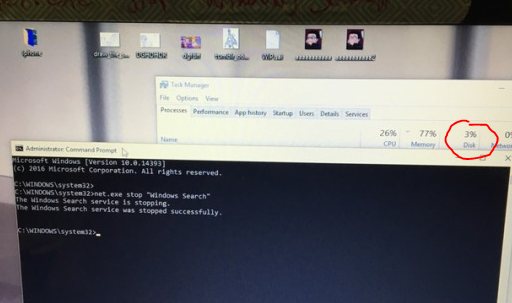
y’all didn’t even add a tutorial of how to do this so imma put one right here
1. type in cmd.exe into your windows search and right click on Command Promt search result and select “Run as Administator”. 2. Type/Copypase in
net.exe stop “Windows Search” and make sure Windows Search is in quotations. It should then respond saying “The Windows Search service is stopping” and then tell you it’s stopped.
This is only a temp fix though, if you want it switched off permanently then do THIS:
1. Press the Windows key + R at the same time and type in services.msc.
2. Scroll until you find Windows Search and double click it to enter its Properties window.
3. Change the Startup type to Disabled. Apply this change and you can exit out.
VOILA, NO MORE TAKEN UP DISK SPACE
Reblog to save a fucking life, FUCK CORTANA.
ALSO, IF YOU HAVE WINDOWS 10 AND ARE WONDERING WHY YOUR INTERNET BROWSING IS CONSUMING FAR MORE OF YOUR CAP THAN IT REALLY SHOULD BE, YOU MAY WANT TO GO TO SETTINGS -> UPDATE AND SECURITY -> ADVANCED OPTIONS -> DELIVERY OPTIMIZATION AND EITHER SWITCH “ALLOW DOWNLOADS FROM OTHER PCS” OFF, OR SET IT TO ONLY LOCAL NETWORK RATHER THAN LOCAL NETWORK AND THE INTERNET.
BASICALLY, SOMEONE WORKING ON WINDOWS 10 FIGURED OUT THAT THEY COULD SAVE ON BANDWIDTH BY SETTING UP WINDOWS 10 COMPUTERS TO DO PEER-TO-PEER SHARING WHETHER OR NOT THEIR USERS WANTED IT, AND WHICHEVER MICROSOFT EMPLOYEE IS FIRST TO TELL ME WHO IS RESPONSIBLE FOR THIS FAIRLY WEASELLY LITTLE STUNT GETS TO LIVE.