hey!! sorry to hijack this post, but there are a bunch of ways you can make videogames without knowing shit about computers!!
for starters, there’s Twine, which is fucking great for making all kinds of interactive experiences (it’s what Crystal Warrior Ke$ha was made in so you KNOW it’s good) at all skill levels (i picked it up and made a game in two minutes a few nights ago)
if you want a bit more involved experience there’s Inform 7 which is a simple language for text-based adventure games that reads like slightly-weird English and also relatively easy to learn
you can do some pretty fucking cool stuff with Unity (my personal engine of choice) but you may need to dig a bit farther to get at the good stuff. there’s lots of really good presets though (i made an entire game just mixing and matching pre-existing templates and adding in my own art, won an award at a game jam for that one) and if you want help the community’s pretty dang friendly from what i’ve seen!
this is just a taste of what’s out there from what i’ve seen, but there’s so many cool resources out there. if anyone wants help getting started, i’m around to give you a leg up on making something in the coolest, most unexplored art medium around!
I’m addin’ to this post because lowering the barrier to entry for making games is super important to me!!!! If y’all have any questions about making games, you’re welcome to come and ask! I made this list a while back with some friends, so it has some of the programs John already mentioned.
2D Editors:
GameMaker : Potential for pure drag-and-drop “programming”. It is recommended to read-up on the program’s functions to make good use of it. Good for prototyping. Uses its own language called Game Maker Language (GML) that is similar to a C language (e.g. C++ or C#). For both Mac and PC; free version available.
Construct2 : Drag and drop level editor that uses an “If-Then” event sheet structure for programming. Good for prototyping and for beginners. For PC; free version available.
GameSalad : Drag and drop with no code requirement. Good for programming. For both Mac and PC; free version available.
Solpeo : HTML5 based game engine for 2D and isometric game development. Some programming knowledge needed. Platforms supported: Chrome, Firefox, Internet Explorer 9+. Free version available.
Stencyl : Drag and Drop “programming,” templates you can edit the variables/values for.
Scratch : Lego-block-style coding platform by MIT; totally free and a great intro to thinking in code. Very kid-friendly and comes with a community site. Browser version available.
3D Editors:
Unity : 3D editor that creates 3D games. Can build games for browser, as an app, or for mobile devices (iOS and Android). For both Mac and PC; free version available.
UDK (Unreal Development Kit) : Full-fledged, highly advanced editor. Features a complete set of tools that go from level design to visual scripting to cut-scene creation. Uses it’s own programming language called Unreal Script that can be arranged with Kismet, a visual code editor. For Mac and PC; free.
2D Art/Animation Software:
GIMP : Free photo editing and digital painting software.
Easy Paint Tool SAI : Free digital painting software with a UI similar to Photoshop.
Mischief : Free digital painting software with an endless canvas.
3D Art/Animation Software:
Sculptris : From the company that created Zbrush, this free software is ideal for beginning 3D sculptors.
Maya : Animation, VFX, lighting, and rendering software.
Magical Voxel : Voxel Art (3D Pixel Art). Very intuitive and quick to pick up.
SketchUp : Architectural modeling software, great for creating 3D environments and buildings. Free version available.
Text-Based Games:
Twine : Create interactive text stories using Twine’s visual map system that links your game together. Easy to learn and use. End result is browser-based. For Mac and PC; free.
Quest : Interactive text stories that you can build in-browser.
Ren’Py : Create visual novels using a modified version of Python that reads like a combination of stage directions and a CYOA novel. For PC, Mac, and Linux; free.
Audio Resources/Editors:
Indie Game Music : This site offers free indie music with no need to worry about royalties or licenses.
Audacity : A free, open-source, cross-platform sound editor that allows you to record and arrange sound.
Super Flash Bros. : This site allows you to record theremin-like (8bit) sounds and export them as .wav files for your games.
The Beyond TYPO font was created for the international design conference TYPO Berlin 2016, as a felt pen typeface, together with a host of OpenType features.
The designers, Steff Stefanidad (Stefanidad, studio adhoc) and Ulrike Rausch (LiebeFonts), developed the display typeface with inspiration from the rich variety of shapes in the world of microbial life forms.
It was initially hand written with a thick felt pen by Steff Hengge. Ulrike Rausch transformed those hand-written drawings into a font with OpenType. Each character has alternate forms. There are many special ligatures and each letter has initial and end shapes, producing biomorphic extensions. Ulrike answered some question about the production process:
What was the most rewarding part of the design process? The most challenging? The most quirky?
Our starting point for the Beyond TYPO font were Steff’s sketches for the letter forms she drew with a felt-tip pen.
We wanted to preserve the hand-written look, so we added plenty of alternative forms. I even programmed an OpenType feature to shuffle the different letter alternates automatically.
The most challenging part was TYPO team’s request to make the font “feel alive”. This also turned out to be the most enjoyable aspect of producing the font: Steff had drawn these cute tiny creatures that gave us the idea of sticking them to the letters. That way it looks like they grow on the words. With the help of OpenType magic, the first and last letters of a sentence grow crazy tentacles, eyes, and other organic forms. Try it out yourselves, it’s fun!
How do you hope designers and non-designers alike will respond to the font?
I hope designers will enjoy this font as much as we enjoyed creating it! It’s a great opportunity to educate designers about the OpenType capabilities (that also exist in other professional typefaces for features like small caps, figure styles, and alternative glyph forms).
Unfortunately most layout software and operating systems hide OpenType options very well—somewhere deep down in their menu structure. It can be a real eye-opener how many neat things a contemporary professional font can do if you know how to apply the right options.
So do check out the tutorial that comes with the fonts. It explains how to easily access all the features that make the Beyond TYPO font special.
I found the most awesome interactive map of the Star Wars Galaxy. You can zoom in and out, it gives you Regions (Outer Rim, Colonies, ect), if you hover the mouse over a planet or hyperspace route you get the name and if you click you get info plus a link to the wiki article for more info, and it have visually sorted the planets in canon and legends.
There is also a search function planned, but it doesn’t work right now. This is a serious gift to fic writers and other nerds who find the Star Wars wiki confusing and can’t afford (or don’t want) to buy the official atlases.
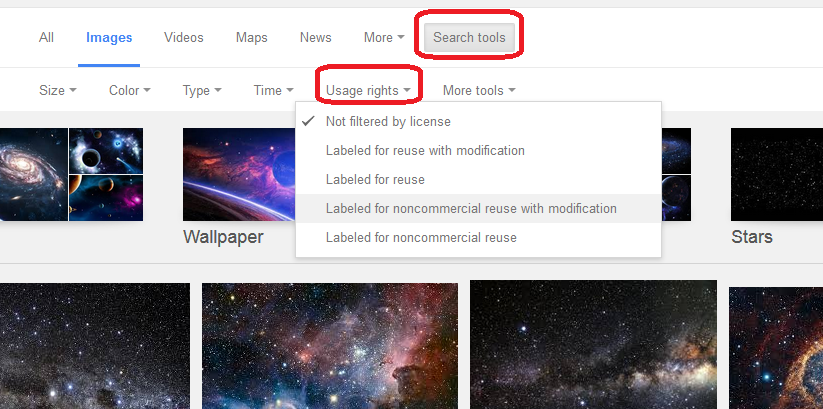
fun fact! google image search allows you to search for images that you are legally allowed to use for example as textures for your art or as assets for your blogs and websites
I keep forgetting that not everyone knows about this.